Reading a flip card: the front, the back and the greyed ones
How to use the tool on the Spreadsheet page: what each face of a card shows, what the seven ticks do, why the cards are ordered the way they are, and which parts are our judgement.
What the front of a card tells you
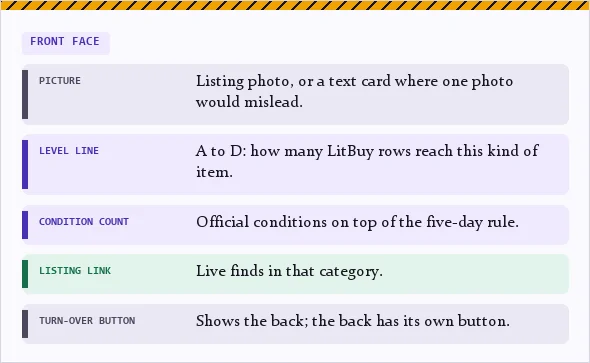
The front is built for the decision you make before the cart. The picture is a listing photo from that category; for gadgets and for fragrance and beauty we use a text card instead, because a single product photo would suggest one rule when LitBuy has several.
Under the picture: a level line (A to D), the number of official conditions that sit on top of the general five-day rule, and a link to live listings in that category. The link carries a small tracking tag so we can see which cards are used; the tag identifies this referring site and category, rather than a personal identifier added by this catalogue. The destination site receives the visit under its own privacy terms.
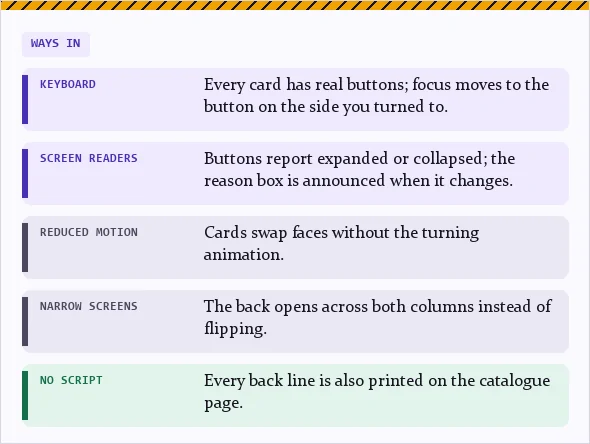
The dark button turns the card over. On a narrow screen the back opens across the full width instead of flipping, which keeps it readable.
Use a card to form the question before purchase
Choose a category, then check the actual seller listing for the item’s specific features. A standard garment, a customised version and a sealed set can look similar in a catalogue but carry different return questions. Record the exact option and quantity before copying the link into LitBuy. The card summarises a rule group; it is not an approval attached to your order.
If a feature is uncertain, inspect the listing or ask before selecting an answer in the tool. Do not choose the most favourable setting simply to obtain an available return result. A useful outcome is a question you can put to the agent about this product, its original condition and the proposed buying method. The seller and current order terms still matter.
Four lines on the back, and where each comes from
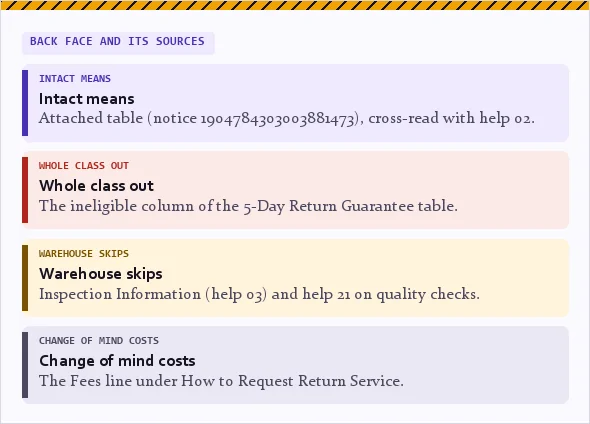
- Intact means
- The condition the item has to stay in, taken from the attached Special Standards table and cross-read with the version inside help article 02. Where neither table names the category, the line falls back on the general test: unused, tags on, packaging and accessories present.
- Whole class out
- Whether a never-returnable class from the eligibility table sits inside the category, such as leggings inside joggers.
- Warehouse skips
- What the inspection page and help 21 say is outside the check for that kind of item.
- Change of mind costs
- The same three charges on every card: postage back, the seller's original postage, and CNY 5.
Seven ticks and the page behind each one
The condition bar has two groups. The first describes how the item reaches LitBuy: pasted as a Fill&buy link, forwarded from elsewhere, bought second-hand, or bought from a seller outside mainland China. The second describes what you plan: you might change your mind, you plan to remove tags, original product packaging or a required seal, or you are ordering something personalised.
Each tick carries the page it relies on. When a card goes grey, the reason printed on it names that page, so you can check our reading against LitBuy's wording rather than take it on trust.
Why four of the ticks grey out every card
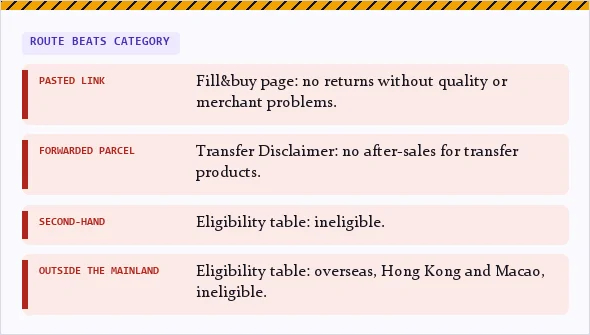
Four conditions are about the route an item takes, not about what it is, so they knock out the whole wall at once. LitBuy's Fill&buy page says that for products pasted from other platforms “returns without quality issues or merchant-related problems are not accepted”. The transfer Disclaimer says LitBuy “won't provide any after-sales service” for forwarded goods. Second-hand goods and goods from outside the mainland are rows of their own in the ineligible column.
We kept them as ticks anyway, because the moment of truth is often a single order that mixes routes: three items from a store and one pasted link.
Why the cards run from Level A to Level D
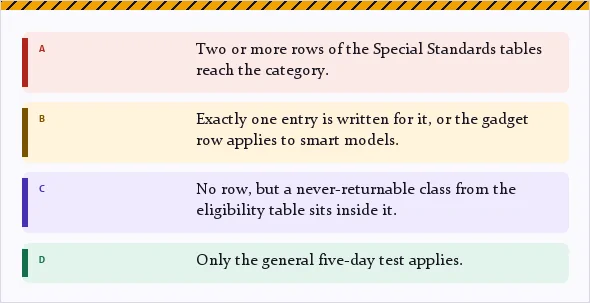
The order is a count, not a ranking of products. Level A categories are reached by two or more rows of the Special Standards tables; Level B by exactly one entry; Level C by no row but a never-returnable class that sits inside the category; Level D by the general five-day test alone.
Within a level the order is ours and carries no meaning. A Level D card does not mean a returnable item; it means the general conditions apply, which still include the seller agreeing and the request landing inside 120 hours.
Matching catalogue categories to LitBuy's own names
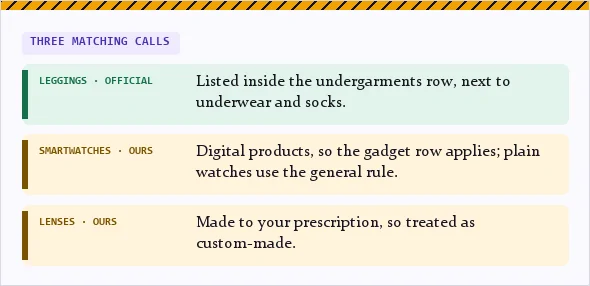
LitBuy names its rows after its own product tree. Sixteen catalogue categories do not line up with that tree one to one, so each card is a match we made. The catalogue page lists every match.
Where LitBuy spells the answer out, as it does for leggings, the card says so. Where we had to apply an entry to a category ourselves, as with smartwatches and prescription lenses, the card calls it our reading. If LitBuy's wording ever contradicts a card, the LitBuy wording is the one to follow.
What the cards leave out on purpose
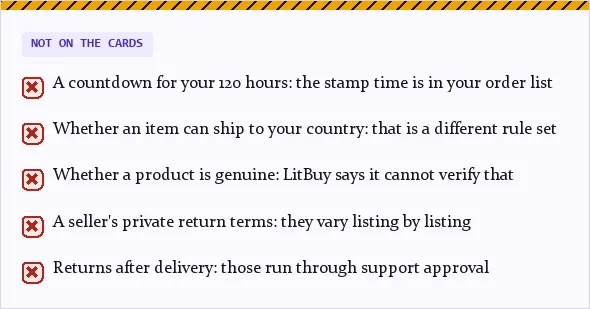
There is no countdown. Your order list shows the Warehoused time, and the arithmetic is two lines on the window page. Nothing on the cards says whether an item can be shipped to your country; that is a separate rulebook, and mixing it in would make the cards wrong for half their readers.
The cards also say nothing about whether a product is genuine. LitBuy's own disclaimer says buyers accept that “product quality and authenticity cannot be verified”, and a return request is not a test of either. Seller-specific terms and returns after delivery are left to the seller and to LitBuy support.
Keyboard, screen readers and small screens
The turn-over controls are buttons, so they work from the keyboard, and each reports whether its back face is showing. After a turn, focus moves to the button on the side you are now looking at. The reason box on a greyed card is a live region and is read out when it changes.
If your system asks for reduced motion, the cards swap faces without the turning animation. Without JavaScript the ticks do nothing, but every card back is repeated in full on the catalogue page.
The condition bar itself is a set of ordinary checkboxes with visible labels, grouped into two fieldsets, so a screen reader announces the group name before each tick. The summary line under the bar (how many cards have no extra warning, need a check or are greyed out) is announced each time it changes, and the clear button resets every tick at once.